
Condo management software that gives the building one shared record.
Management runs the work. The board sees it. Residents follow it. Maintenance, vendors, documents and announcements stay with the building instead of someone's inbox, at one price per building, whatever its size.
$39.90/month per building after the trial. A 558-unit condominium is still one property.
Eligible new subscriptions get 90 days free. A payment method is required and nothing is charged during the trial. A quote needs no card at all.

Everyone shares the building. Almost no one shares the information.
Owners, tenants, the board, the manager, the front desk and a rotating cast of vendors all need part of the same picture. When it lives in separate inboxes, every question becomes a search.
Residents are left asking.
So they call and email to ask, and the same update gets written five times.
The board is left searching.
Contracts, inspection reports and insurance certificates sit in someone's personal drive.
The bill grows with the building.
Per-unit and per-user pricing punishes large buildings for being large.
Everything the building runs on, under one account.
Each building gets the same set of tools. Everything below is included with every active property.
Maintenance requests
Residents report problems; your team sets priority, assigns vendors, records estimates and notes, and tracks status to completion. See the request workflow.
Vendors
A private vendor list per building with contacts and insurance status, plus the Vendor Network to find and ask companies for quotes.
Inspections and projects
Track inspection dates and inspectors, and capital projects with budget, vendor, dates and status.
Document library
Contracts, reports and certificates organized by category, each with its own visibility, from residents to management only.
Property history
A dated timeline of requests, documents, inspections and announcements, with who made each change.
Announcements
Official notices, events and resident posts approved by management, in one feed residents can check.
Residents and units
Residents, board members and staff join by email invitation and are linked to their building and unit.
Emergency Center
Emergency contacts and the on-site security or front desk number, one tap away for residents.
More than one building
Manage several properties from one login and one subscription, each with its own records.
Real screens from a sample condominium.
Harbor View Condominiums, its residents and its vendors are sample data. The screens are PropertyFlow as it works today.
Give each document the right audience.
Upload contracts, inspection reports and insurance certificates by category. New documents start visible to the board and management; sharing a file with every resident is a deliberate choice.
Each upload is recorded on the property history with the date and the person who added it.
Tell the whole building once.
Post maintenance notices, events and general updates to the property's feed. Residents can suggest posts, and management approves what's published.

See what's open, who's on it and what it costs.
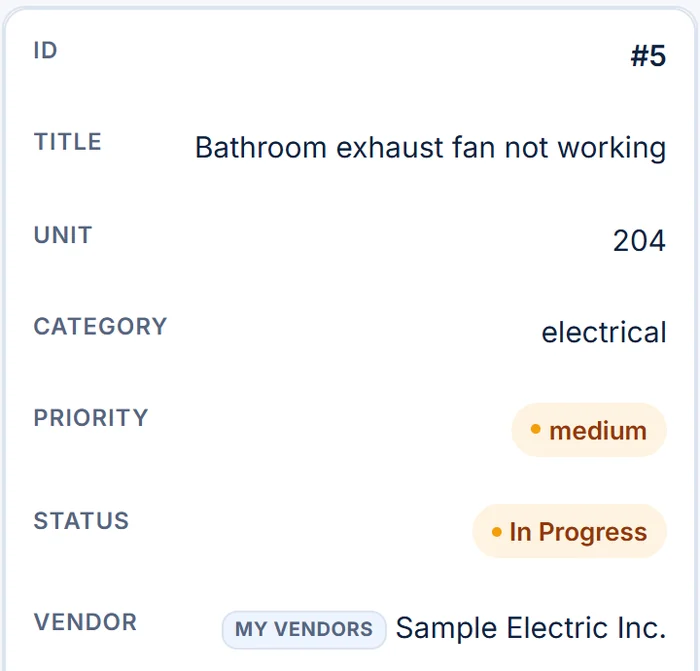
Every request shows its unit, category, priority, status and assigned vendor, so the manager and the board look at the same list.

Keep the building's memory when people change.
Board terms end and managers move on. The timeline keeps what happened, when and by whom, so the next person starts with the full story.

Same building. The right view for each person.
Run the building.
- One login for one building or a portfolio
- Requests, vendors and documents together
- Invite the board, staff and residents
Stay informed.
- See every maintenance request
- Find documents shared with the board
- Review the property history
Get answers.
- Report problems and follow status
- Read announcements
- Reach emergency contacts
Log what they see.
- Submit requests for common areas
- Work from the same list as management
One price per building. Every unit and every person included.
The price is published, there's no sales call needed to see it, and it doesn't rise as you add residents.
- Active propertyAny building on your account that isn't archived. A 558-unit condominium is still one property.
- Free trial90 days for eligible new subscriptions, from the day you start. Payment method required; nothing is charged during the trial. A property or subscription that already used a trial isn't eligible.
- First property$39.90/month, after the free trial if eligible
- Each additional property$19.90/month on the same subscription. Adding a property doesn't start a new trial.
- Units and usersUnlimited, never billed per person
- 90 days free for eligible new subscriptions
- Payment method required; nothing is charged during the trial
- Cancel anytime from Billing & Subscription
Your board needs a written quote before anyone adds a card?
Request a written quoteFull pricing details are on the PropertyFlow home page.
What does condo management software do?
It gives the management team, the board and residents one shared place for the building's day-to-day work. In PropertyFlow that means maintenance requests, vendors, documents, announcements, inspections, projects, emergency contacts and a dated history of what changed.
Is PropertyFlow for self-managed condos or management companies?
Both. A self-managed association can run one building on its own account, and a management company can manage several buildings from one login, each with its own records.
How is pricing calculated for a large condominium?
Per building, not per unit. The first active property is $39.90/month and each additional one is $19.90/month, after the 90-day free trial for eligible new subscriptions. A 558-unit condominium is still one property.
Who can see each document?
Each document has its own visibility setting. New documents start visible to the board and management, and an administrator can choose to share a document with all residents.
How do residents join?
By email invitation from the property's administrator. Residents, board members and staff don't self-register, which keeps each building's resident list accurate and private.
Can residents use it on their phones?
Yes. PropertyFlow works in any modern browser on a phone or computer, and residents can add it to their home screen.
How does the 90-day free trial work?
Eligible new subscriptions get 90 days free from the day they start, with the full product. Eligibility is checked when you start: a property or subscription that already had a trial or a subscription with PropertyFlow isn't eligible and is billed from the start. A payment method is required, and nothing is charged during the trial. There is one trial per subscription, and adding a property doesn't start a new one.
Can our board see pricing before anyone enters a card?
Yes. Request a written quote with your name, work email and the number of buildings, and we'll reply by email. No card and no obligation.
How do I cancel?
From Billing & Subscription inside PropertyFlow, with no reason required. Access continues until the end of the period you already paid for. See the Terms of Service.
Give your building one shared record.
$39.90/month per property, after the free trial for eligible new subscriptions. Unlimited units and users. The trial needs a payment method; a quote doesn't.