
Every HOA maintenance request, on the record.
Residents report it once. Your team assigns the vendor, logs the estimate and moves it to done. Every step carries a date and a name, so when the board asks what happened, the answer is already written down.
$39.90/month per property after the trial. Unlimited units and users.
Eligible new subscriptions get 90 days free. A payment method is required and nothing is charged during the trial. A quote needs no card at all.

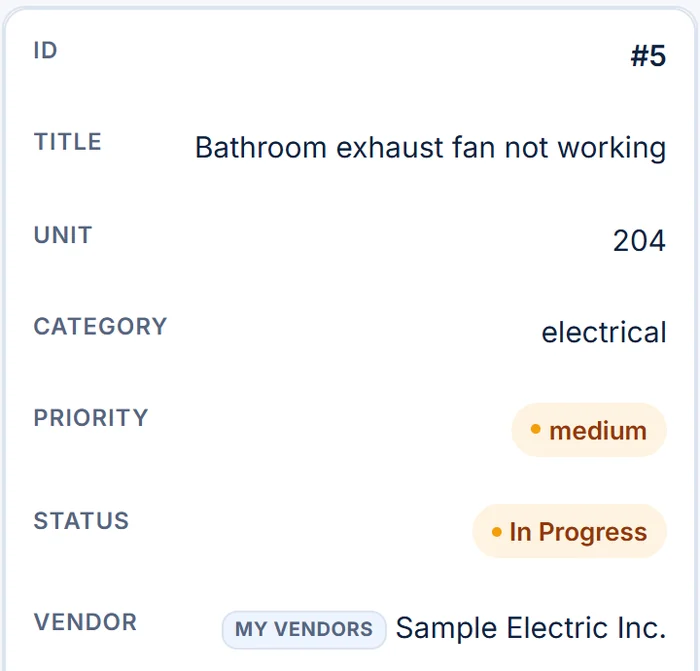
The repair gets done. The record doesn't.
Most associations don't lose track of the leak. They lose track of who reported it, which vendor came, what it cost and when it closed. That's exactly what residents and boards ask about.
Requests come in through every door.
Texts to a board member, emails to the manager, a note at the front desk. Nobody has the full list, so nobody can say what's still open.
Nobody can say who has it.
The vendor was called, but the estimate lives in an inbox and the visit date lives in someone's phone.
The history walks out with people.
When a manager changes or a board turns over, the record of past repairs goes with them, and the next person starts from zero.
PropertyFlow turns each request into a record: the report, the vendor, the estimate, the notes and every status change, each with a date and a name. Your team and your vendors still do the work. PropertyFlow keeps what they did on file.
From report to resolved, in four recorded steps.
Real PropertyFlow screens with a sample property, sample vendors and sample residents. No mockups.
-
STEP 01
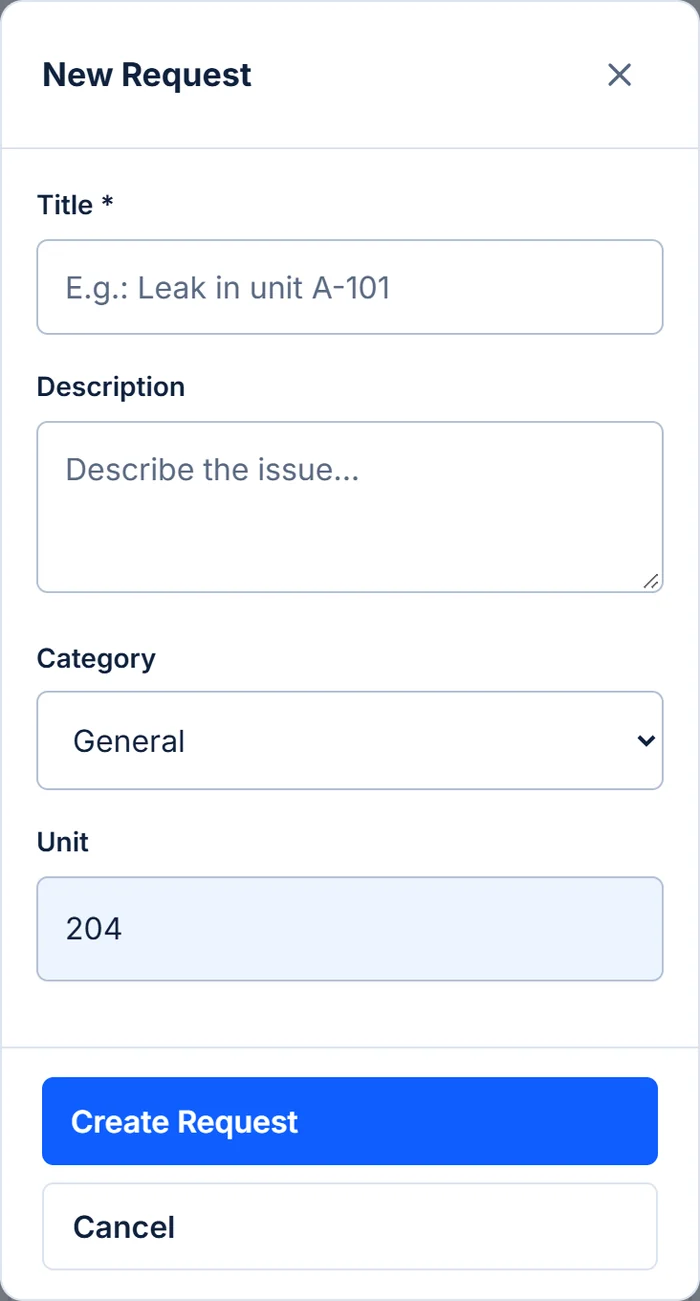
Reported once, by the people who live there.
Anyone with an account linked to the property can submit a request from a phone or a computer: residents, tenants, board members and staff. The unit fills in from their account.
- Property administrators get an email about each new request
- The resident gets an email confirming it was received
- Residents only see their own requests
-
STEP 02
Triaged and assigned by your team.
Set the priority and category, pick a vendor from your property's private list and record the estimated cost and notes. Only property administrators can change these fields.
- A vendor with an email on file is notified when assigned
- Or ask up to 10 Vendor Network companies for availability or a quote
- Choosing who does the work always stays your decision
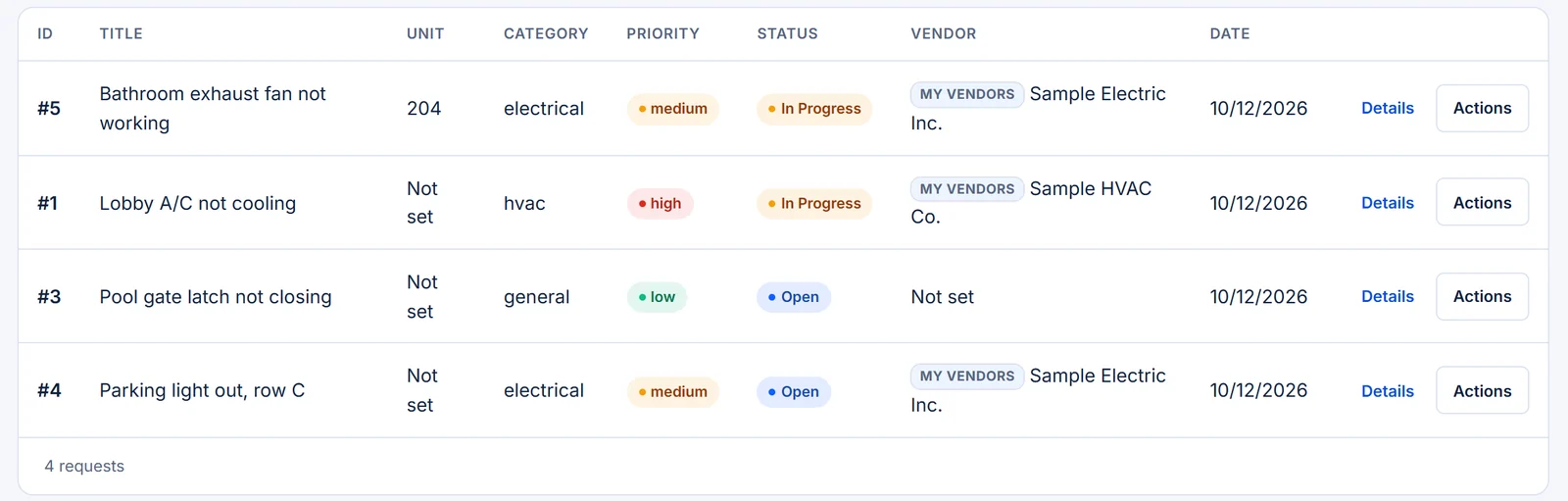
Service Requests.Request detail. Sample data. -
STEP 03
Residents follow along without calling.
When a vendor is assigned and when the status changes, the resident who reported the request gets an email. In the app they see the status, the priority and who's handling it.
- Fewer "any update?" messages to the manager
- The same status the management team sees
-
STEP 04
Closed, dated and kept.
Status changes, documents, inspections and announcements are added to the property timeline with the date and the person who made the change. Completed requests can be archived, never silently lost.
- Answer the board with a date and a name
- Hand over a property without losing its past
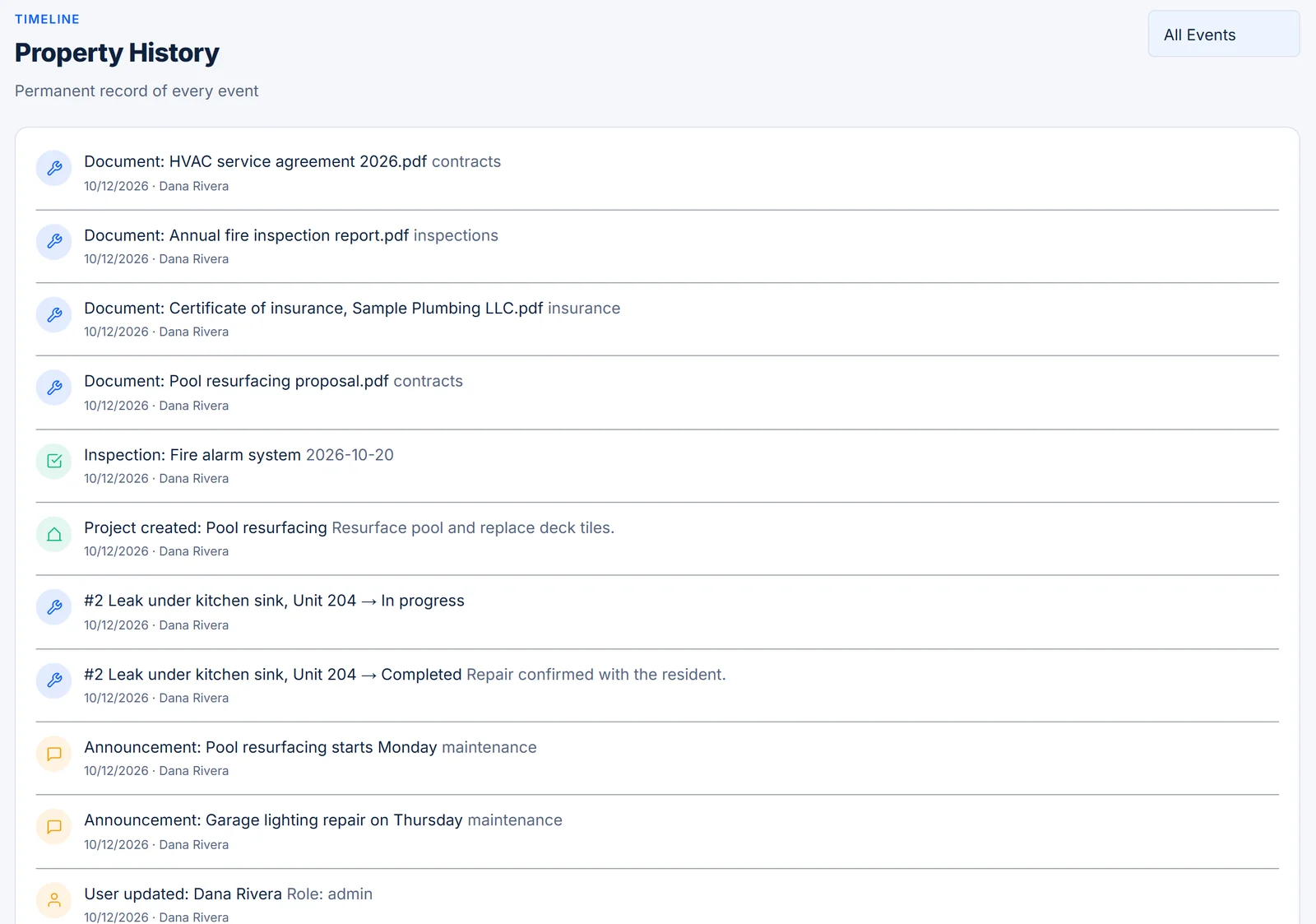
Property timeline. Sample data.

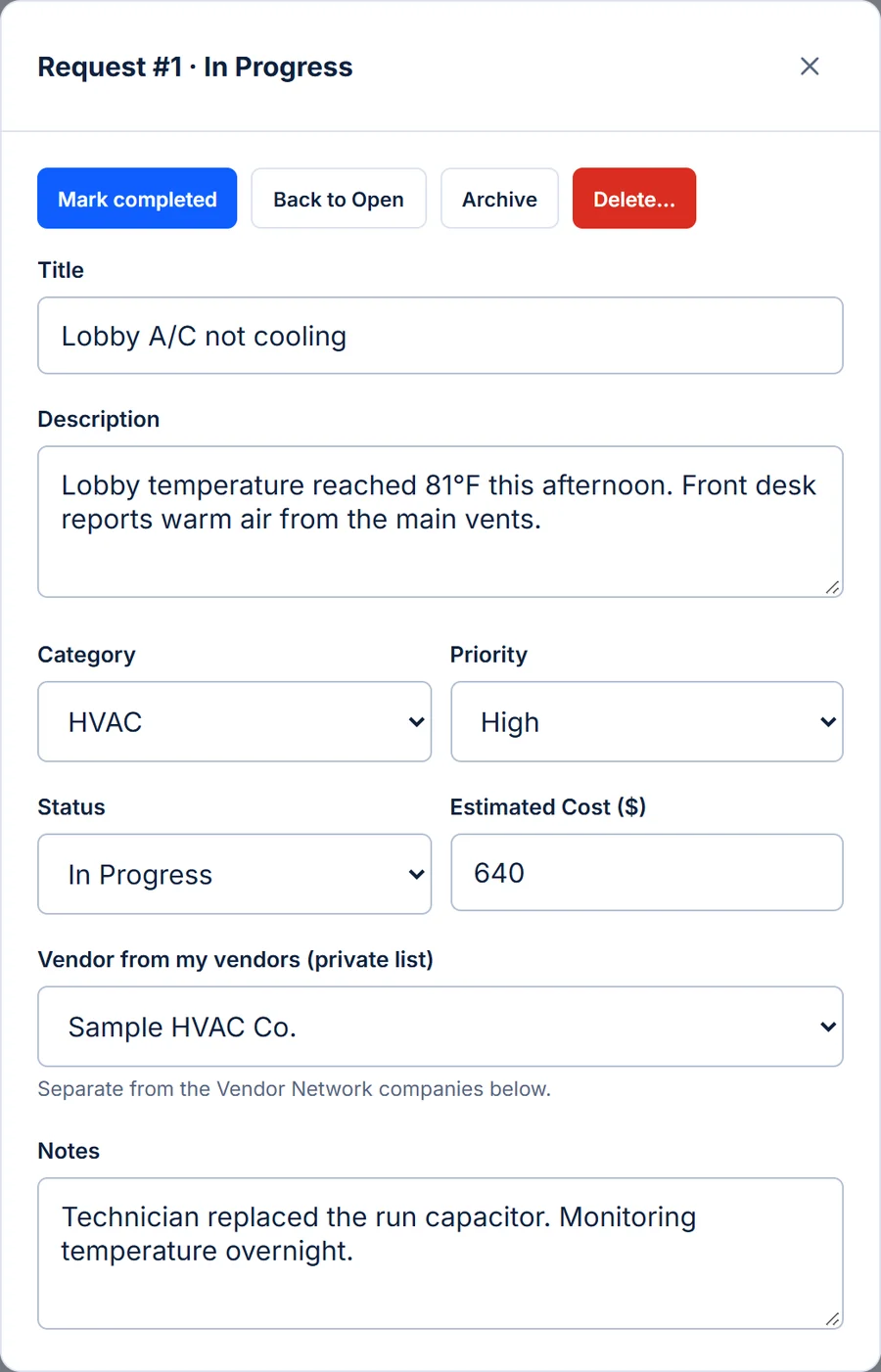
The board's questions, answered on one screen.
No more stitching together a timeline from emails. Each request carries the facts your team records as the work moves.
Status
Open, in progress or completed, changed by your team and visible to the resident who reported it.
Priority and category
Sort what's urgent from what can wait: plumbing, electrical, HVAC and more.
Vendor
From your private vendor list, or a Vendor Network company you chose to work with.
Estimated cost
The number the board will want before approving the work.
Notes
What the technician found, what was replaced, what happens next.
History
Each status change with the date and the person who made it.
One record. Four people who rely on it.
Run the queue.
- See every open request in one list
- Filter by status and category
- Assign vendors and record estimates
Get the answer.
- View every request on the property
- See estimates before work is approved
- Review the history of past repairs
Report once.
- Submit from a phone or computer
- Get an email when things change
- Check status without calling
Know the job.
- Private vendors get an assignment email
- Vendor Network companies submit quotes from their own dashboard
Clear about what it does for HOA maintenance, and what it doesn't.
What it does
- Collects requests from residents, board members and staff with an account
- Tracks each request with status, priority, vendor, estimate and notes
- Keeps a private vendor list with contacts and insurance status
- Records the history of each change on the property timeline
- Includes everyone on the property without per-user fees
What it doesn't do
- It doesn't perform repairs. Your team and your vendors do the work.
- It doesn't verify insurance. Insurance status is what your team records for each vendor.
- It doesn't process vendor payments. Properties pay vendors directly, outside PropertyFlow.
- It doesn't guarantee Vendor Network responses. Companies choose whether to answer a request.
Priced per property. Never per unit, never per person.
A 200-unit HOA and a 12-unit association pay the same for one property. Add residents, board members and staff without changing the bill.
- Free trial90 days for eligible new subscriptions, from the day you start. Payment method required; nothing is charged during the trial. A property or subscription that already used a trial isn't eligible.
- First property$39.90/month, after the free trial if eligible
- Each additional property$19.90/month on the same subscription. Adding a property doesn't start a new trial.
- Units and usersUnlimited, never billed per person
- CancelAnytime from Billing & Subscription; access continues until the end of the period you paid for
- 90 days free for eligible new subscriptions
- Payment method required; nothing is charged during the trial
- One trial per subscription; a property or subscription that already had one isn't eligible
Want numbers on paper for your board before adding a card?
Request a written quoteFull pricing details are on the PropertyFlow home page.
What is HOA maintenance request software?
It's a shared system where residents report problems and the management team tracks each repair: who reported it, which vendor is assigned, the estimated cost, the current status and what happened along the way. It replaces requests scattered across texts, emails and spreadsheets.
Who can submit a maintenance request?
Any resident, tenant, board member, staff member or administrator with an account linked to the property. People join by email invitation from the property's administrator, so the list of who can submit stays accurate.
Who can change a request's status, vendor or estimate?
Property administrators. Board members can view every request on their property, and residents see their own, but only administrators change status, priority, vendor, estimate and notes.
Are residents notified when their request changes?
Yes. The resident who submitted a request gets an email when it's received, when a vendor is assigned and when its status changes. Property administrators get an email for each new request.
Do vendors need a PropertyFlow account?
No. Vendors on your private list don't log in; your team records their updates on the request, and a vendor with an email on file is notified when assigned. Companies in the Vendor Network have their own dashboard where they see requests shared with them and submit quotes.
Can we get quotes from vendors through PropertyFlow?
You can send an availability or quote request to up to 10 Vendor Network companies at a time from a maintenance request. Each company answers separately in its own dashboard, and assigning the work remains your decision.
How much does it cost for an HOA?
$39.90/month for your first active property, after the 90-day free trial for eligible new subscriptions, plus $19.90/month for each additional property. Units, residents, board members and staff are unlimited.
How does the 90-day free trial work?
Eligible new subscriptions get 90 days free from the day they start, with the full product. Eligibility is checked when you start: a property or subscription that already had a trial or a subscription with PropertyFlow isn't eligible and is billed from the start. A payment method is required, and nothing is charged during the trial. There is one trial per subscription, and adding a property doesn't start a new one.
Can our board see pricing before anyone enters a card?
Yes. Request a written quote with your name, work email and the number of buildings, and we'll reply by email. No card and no obligation.
Does PropertyFlow do the maintenance or manage our association?
No. PropertyFlow is software. Your team and your vendors do the work; PropertyFlow is where you organize it and keep the record.
Put your next repair on the record.
$39.90/month per property, after the free trial for eligible new subscriptions. Unlimited units and users. The trial needs a payment method; a quote doesn't.