
HOA work order tracking, with the cost on every repair.
Every repair your association approves starts as a work order: a problem, a vendor, an estimate and a decision. PropertyFlow keeps all four on one request, with the date and the name behind every change, so the board can see what it is paying for.
$45.00/month per property after the trial. Unlimited units and users.
Eligible new subscriptions get 90 days free. A payment method is required and nothing is charged during the trial. A quote needs no card at all.
Three questions every board asks about a repair.
Good work order tracking is the difference between answering these in a minute and digging through email for an afternoon.
Who is doing the work?
The vendor should be on the work order, not in someone's memory. If the manager is out, anyone on the team should be able to answer.
What will it cost?
The estimate belongs next to the problem it fixes, before the work is approved, so the board compares like with like.
What actually happened?
Notes on what the technician found and replaced, and when the status changed, are what protect the association later.
From request to closed work order, on the record.
Real PropertyFlow screens with a sample property and sample vendors.
-
STEP 01
The problem is reported once.
Residents, board members and staff with an account submit the request from a phone or computer. Property administrators get an email for each new one.
- The unit fills in from the resident's account
- Category and priority set by your team
- One list of everything open
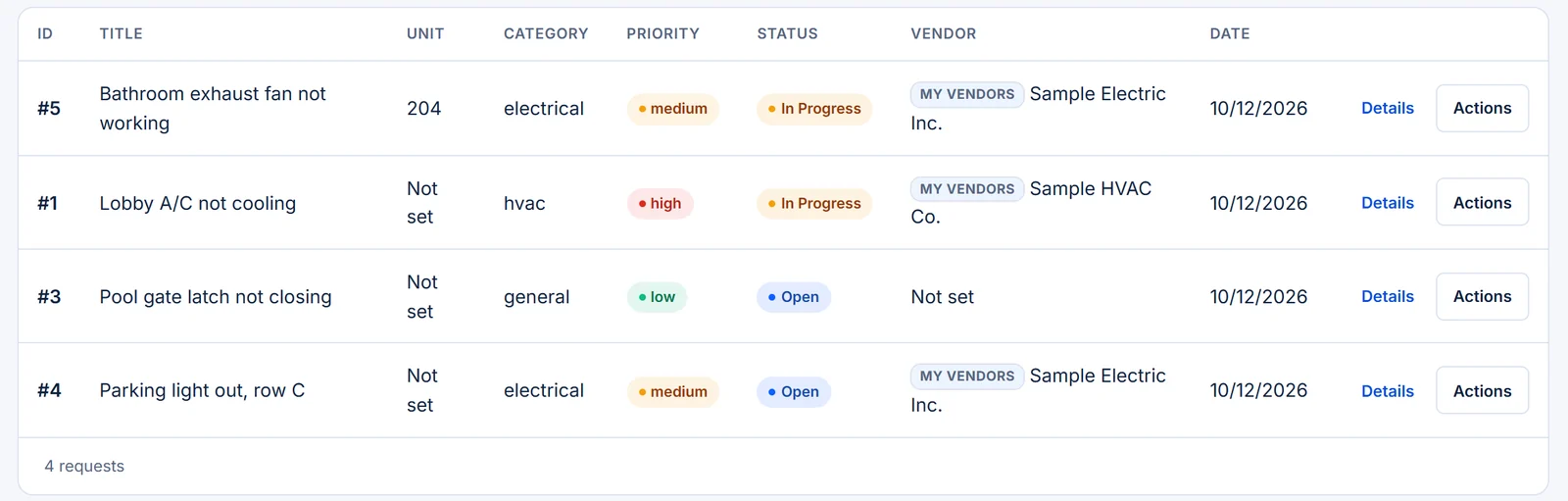
Service Requests, as it appears in PropertyFlow. Sample data. -
STEP 02
The vendor and estimate go on the request.
Your team assigns a vendor from the property's private vendor list and records the estimated cost and notes. A vendor with an email on file is notified when assigned.
- Private vendor list with contacts and insurance status
- Ask up to 10 Vendor Network companies for availability or a quote
- Choosing who does the work stays your decision
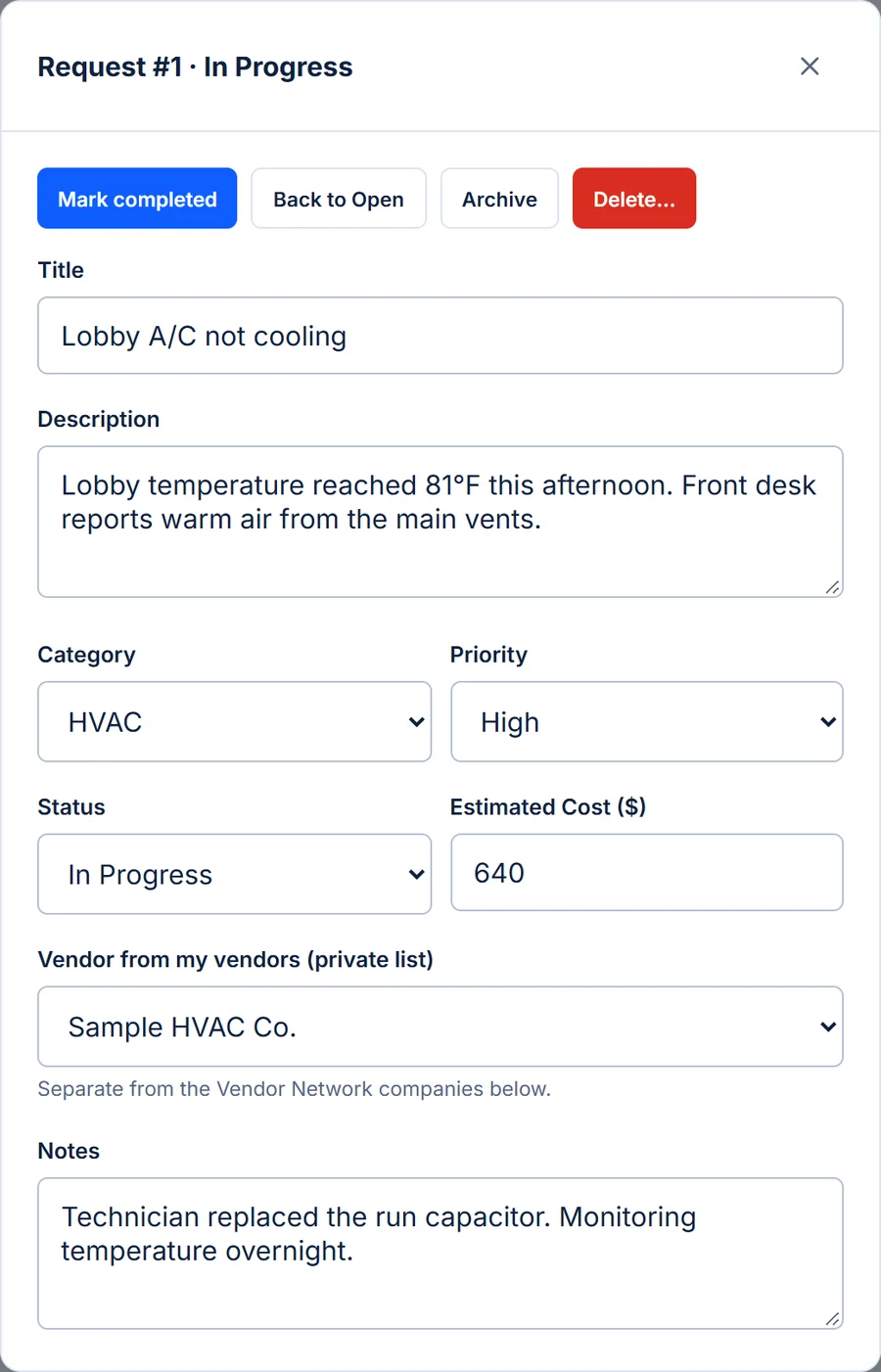
Request detail. Sample data. -
STEP 03
Every change is dated and signed.
Status changes are added to the property timeline with the date and the person who made the change, so the repair history survives staff and board turnover.
- Open, in progress, completed
- Completed requests can be archived, never silently lost
- Service contracts and inspection reports in Documents
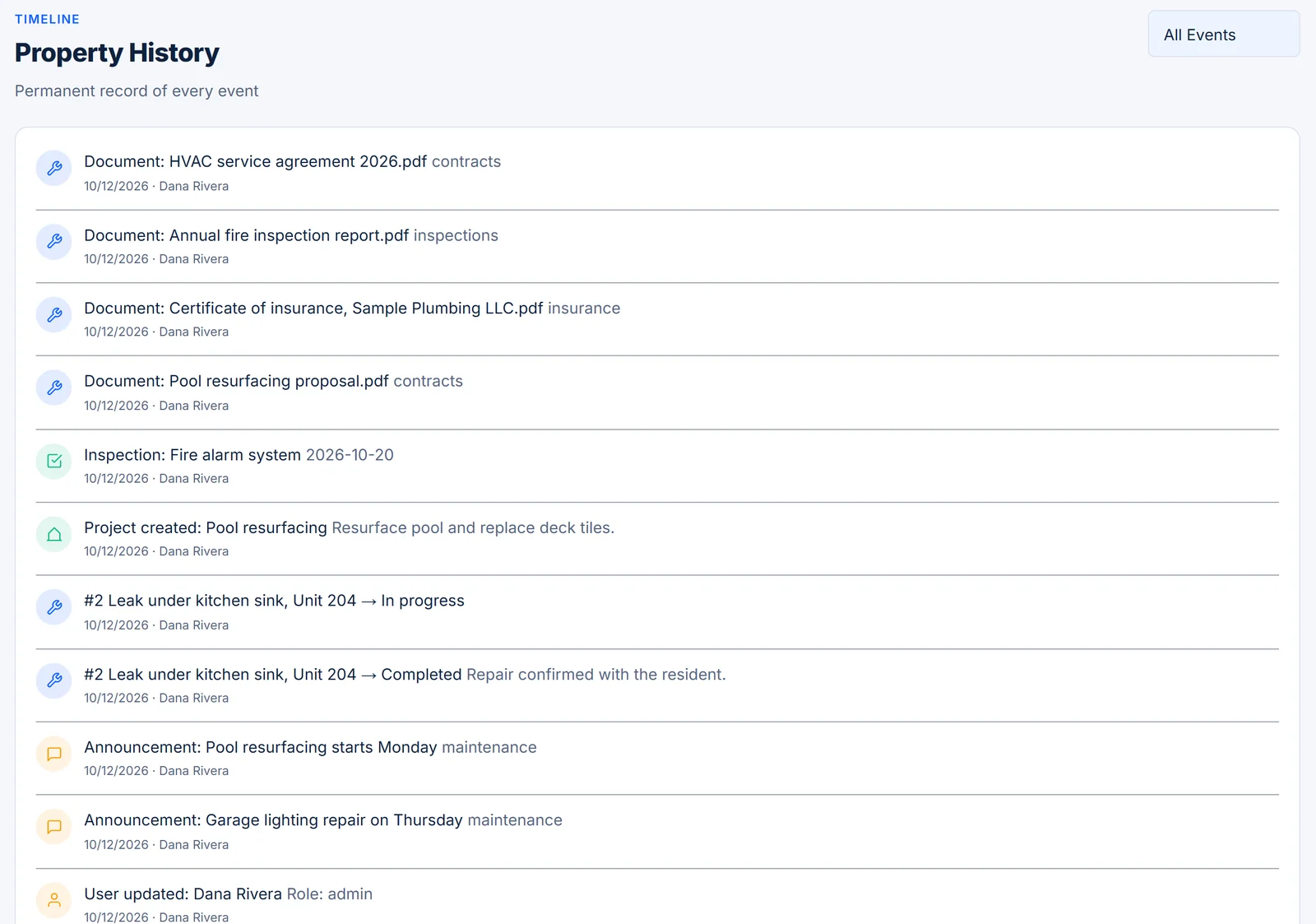
Property timeline. Sample data.


What your team records on each repair.
Each maintenance request in PropertyFlow carries the fields a board needs to understand a repair.
Vendor
From your private vendor list, or a Vendor Network company you chose to work with.
Estimated cost
The number the board wants to see before approving the work.
Priority and category
What's urgent and what can wait: plumbing, electrical, HVAC and more.
Status
Open, in progress or completed, visible to the resident who reported it.
Notes
What the technician found, what was replaced, what happens next.
History
Each status change with the date and the person who made it.
What HOA work order tracking in PropertyFlow covers.
Clear about what is included, and what stays outside the software.
What PropertyFlow does
- Records the vendor and estimate on every request
- Keeps a private vendor list with contacts and insurance status
- Requests quotes from up to 10 Vendor Network companies at a time
- Records the history of each change on the property timeline
- Stores documents such as service contracts and inspection reports
What it doesn't do
- It doesn't perform repairs. Your team and your vendors do the work.
- It doesn't verify insurance. Insurance status is what your team records for each vendor.
- It doesn't process vendor payments. Properties pay vendors directly, outside PropertyFlow.
- It isn't an accounting system. The estimate on a request is a planning figure your team records, not an invoice or a ledger entry.
Work order tracking for every repair, $45 a month per property.
Vendor assignment, estimates, notes, the property timeline and your private vendor list are all included, with unlimited units and users.
- Free trial90 days for eligible new subscriptions, from the day you start. Payment method required; nothing is charged during the trial. One trial per subscription.
- First property$45.00/month, after the free trial if eligible
- Each additional property$19.90/month on the same subscription. Adding a property doesn't start a new trial.
- Units and usersUnlimited, never billed per person
- CancelAnytime from Billing & Subscription; access continues until the end of the period you paid for
- 90 days free for eligible new subscriptions
- Payment method required; nothing is charged during the trial
- One trial per subscription; a property or subscription that already had one isn't eligible
Want numbers on paper for your board before adding a card?
Request a written quoteFull pricing details are on the PropertyFlow home page.
What is HOA work order tracking?
It's keeping each repair as a record: the problem, who reported it, the assigned vendor, the estimated cost, notes and every status change with a date. In PropertyFlow, each maintenance request works as the work order.
Can we track repair costs in PropertyFlow?
Your team records an estimated cost on each request, next to the vendor and notes, so the board can review it before approving work. PropertyFlow doesn't process payments or replace your accounting system.
Can we collect quotes from several vendors?
You can send an availability or quote request to up to 10 Vendor Network companies at a time from a maintenance request. Each company answers in its own dashboard, and assigning the work remains your decision.
Do our own vendors need an account?
No. Vendors on your private list don't log in; your team records their updates on the request, and a vendor with an email on file is notified when assigned.
How much does PropertyFlow cost?
$45.00/month for your first active property, after the 90-day free trial for eligible new subscriptions, plus $19.90/month for each additional property. Units, residents, board members and staff are unlimited.
How does the 90-day free trial work?
Eligible new subscriptions get 90 days free from the day they start, with the full product. Eligibility is checked when you start: a property or subscription that already had a trial or a subscription with PropertyFlow isn't eligible and is billed from the start. A payment method is required, and nothing is charged during the trial. There is one trial per subscription, and adding a property doesn't start a new one.
Does PropertyFlow do the maintenance or manage our property?
No. PropertyFlow is software. Your team and your vendors do the work; PropertyFlow is where you organize it and keep the record.
Put your next work order on the record.
$45.00/month per property, after the free trial for eligible new subscriptions. Unlimited units and users. The trial needs a payment method; a quote doesn't.
Keep the next step clear.
From the first report to the repair record, choose the guide that matches your next step.